Part 4 · Assets & Jump Technology
Jump Technology & Jump Clients
Module 1 promised that PRA never opens an inbound firewall port. Every asset you built in Module 14 has to actually get to its target somehow — and that "somehow" is Jump Technology: either a persistent installed agent (Jump Client) or an agentless network gateway (Gateway, formerly called a Jumpoint). This module is where the outbound-only architecture from Module 1 becomes a concrete, deployable thing.
Two ways to reach an unattended endpoint
PRA's own documentation calls out that "with BeyondTrust Jump Technology, a user can access and control remote, unattended computers in any network" — and that Jump Technology is "integral to the BeyondTrust software offerings." There are exactly two mechanisms for doing this, and picking between them is one of the more consequential architecture decisions an admin makes:
- Jump Client — a small installable application deployed directly on the target endpoint. It maintains a persistent outbound connection to the B Series Appliance, so the endpoint doesn't need to be on any known or reachable network — a laptop roaming outside the corporate firewall works exactly the same as a server sitting in the datacenter.
- Gateway (formerly "Jumpoint") — a single install, on one computer inside a remote LAN, that acts as a conduit to every other reachable Windows or Linux system on that network. One Gateway, many targets — no per-endpoint software required.
This is the direct continuation of Module 1's core promise: both mechanisms make an outbound connection to the appliance. A Jump Client sits on the endpoint and dials out; a Gateway sits inside the remote LAN and dials out on behalf of everything else in that subnet. Neither requires the appliance, or the rep, to ever initiate an inbound connection into the target network — the "no inbound holes" architecture holds all the way down to this layer.
Jump Client: one agent, one endpoint, anywhere
A Jump Client is installed per-machine and stays persistently connected to the appliance, which is what lets you reach unattended Windows, Mac, and Linux computers regardless of where they physically sit — home office, hotel Wi-Fi, a subnet with no VPN back to corporate. Because the connection is always-on and outbound, "unattended access" (no user present to accept the session) becomes possible: the rep just jumps, whether or not anyone is at the keyboard.
Jump Clients also unlock Endpoint Automation — remotely executing scripts across any number of endpoints simultaneously, without opening a session at all — but this is limited to service-mode Jump Clients with an active connection on Mac, Windows, or Desktop Linux.
Deployment is sized like any other piece of infrastructure: BeyondTrust publishes sizing tiers (Small through Atlas) driven by user count and endpoint count, mapping to CPU, memory, and disk recommendations for the appliance side — a reminder that Jump Client fleets at scale are a capacity-planning concern, not just a checkbox.
Walkthrough: deploying a Jump Client
Lab 15 deploys a Jump Client using the Mass Deployment Wizard, generating a platform-specific installer:
- Log into
/loginand navigate to Asset Management > Jump Clients. - Launch the Jump Client Mass Deployment Wizard, choosing an Asset Group and Asset Policy for the resulting Jump Client — exactly the same visibility and access-condition assignment covered in Modules 11–12, set at install time rather than after the fact.
- Select the target Platform (e.g. Windows (x64) MSI) and click Download to generate a uniquely keyed installer.
- Run the downloaded installer (e.g. via
msiexec /i sra-pin-win_x64-<key>.msi) on the target endpoint. - The endpoint appears in the Asset Management Interface, listed alongside other Asset types in whichever Asset Group was chosen during deployment.
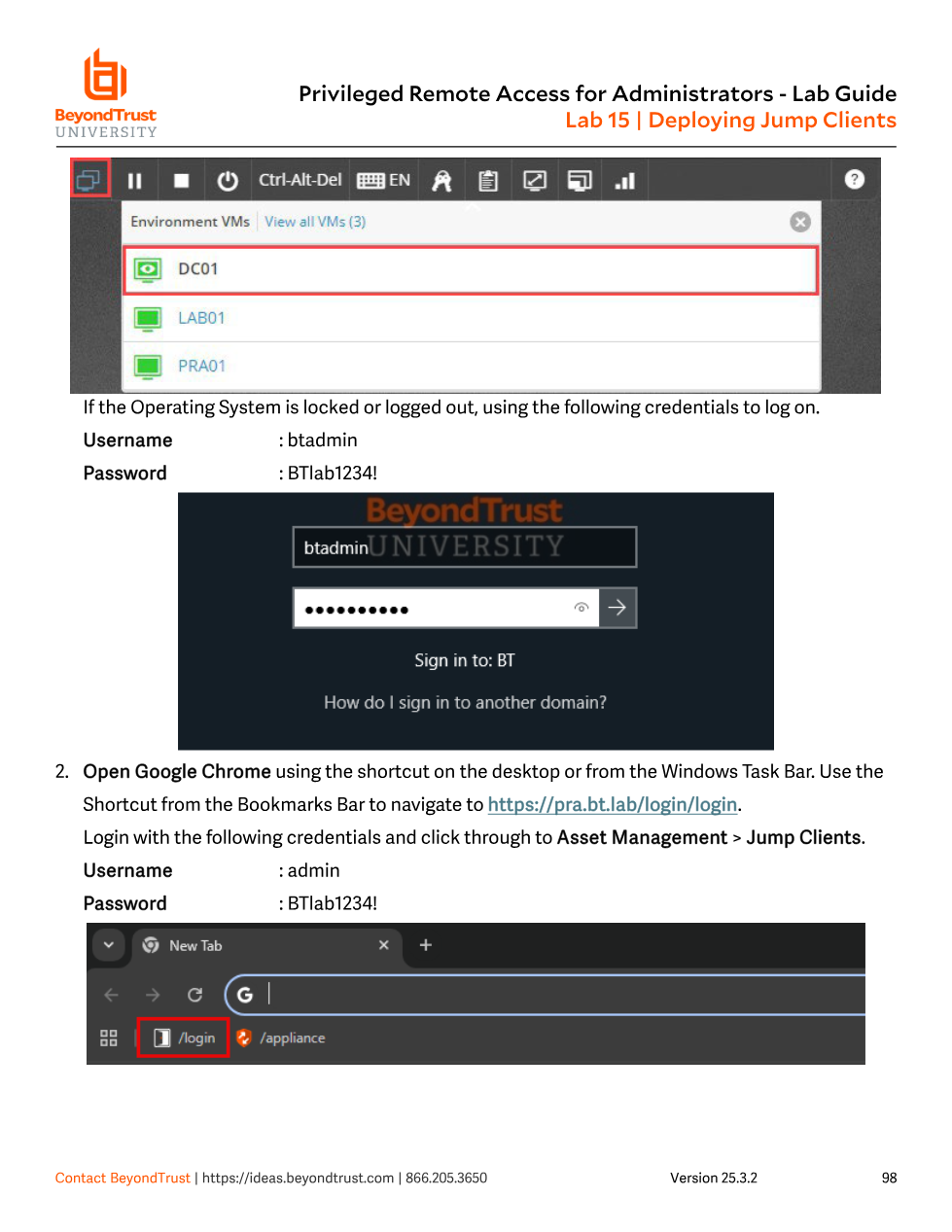
/login on the DC01 VM to reach Asset Management > Jump Clients before generating an installer.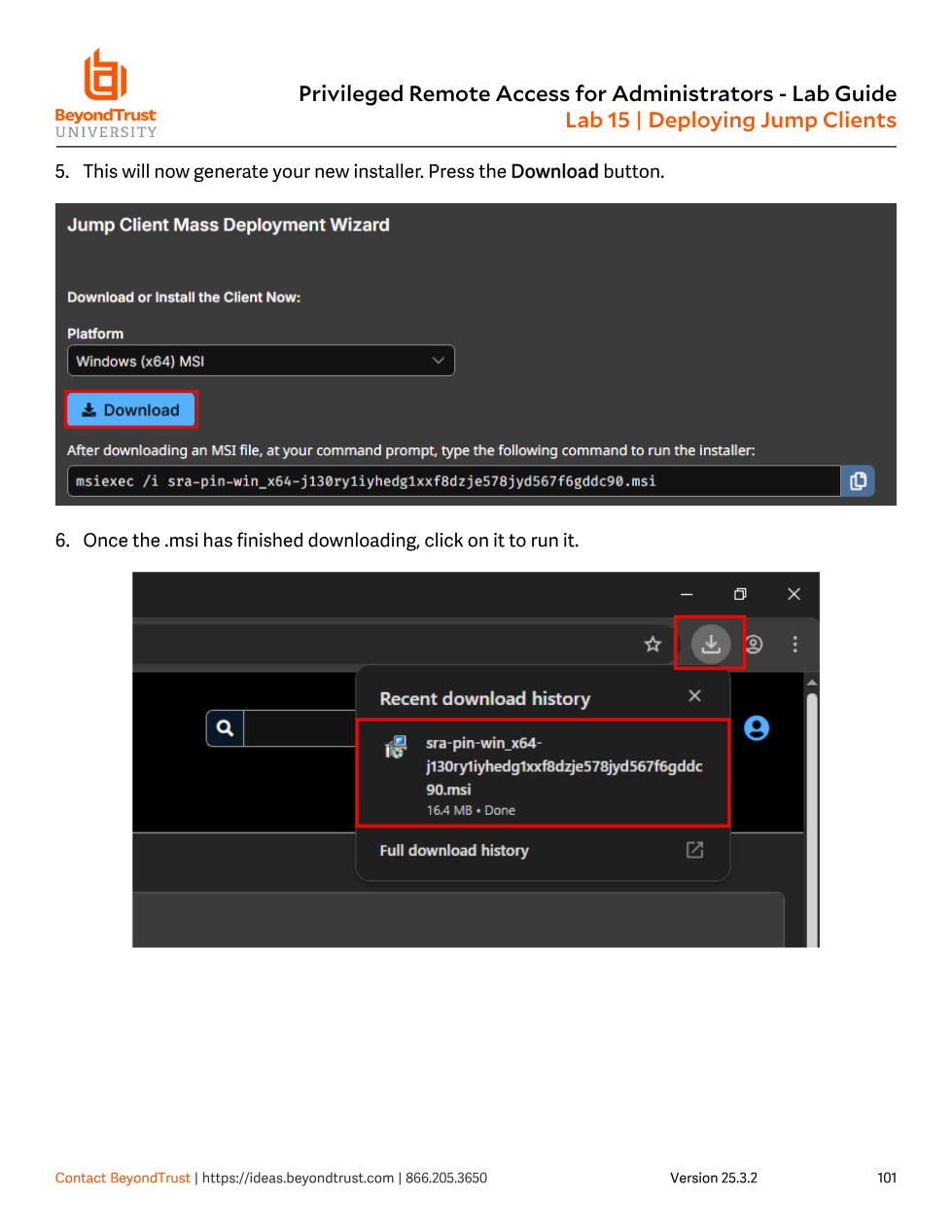
.msi installer; running it on the target endpoint establishes the persistent outbound connection back to the appliance.Gateway: agentless access to a whole subnet
A Gateway is installed once, on a single computer inside a local network, and acts as a conduit for unattended access to every other Windows or Linux system reachable from that network — no software has to be pre-installed on each individual target. The documentation is explicit about when a Gateway is actually needed: if the rep's computer is already on the same local network as the target and has appropriate permissions, it can connect directly without any Gateway at all. A Gateway is only required when the rep's computer cannot reach the target directly — i.e., the target sits on a remote network the rep has no other path into.
This is the trade-off against Jump Client in one sentence: Jump Client is one agent per endpoint, works from anywhere; Gateway is one agent per network, works only for targets on that network. A datacenter subnet with forty servers is a natural Gateway candidate — deploy once, reach everything on that subnet. A fleet of roaming laptops that are never on the same network twice is a natural Jump Client candidate — there's no shared network for a Gateway to sit on.
Only users explicitly added to a given Gateway (individually or via Group Policy) can use it to reach systems on that Gateway's network — the Gateway itself has its own access control layer, separate from Asset Group/Policy/Role, that has to be granted before any asset routed through it becomes usable.
The recommended build order
BeyondTrust's own implementation guidance sequences the whole Part 4 stack in a specific order, and it's worth internalizing because it mirrors exactly what Modules 11–15 covered, in the order that actually works operationally:
- Add Asset Roles — decide what actions users will be permitted once connected, before anything is connectable.
- Add Asset Policies — decide the schedule/approval/notification conditions that will gate access.
- Add Asset Groups — build the visibility containers users and policies will attach to.
- Deploy Assets — install Jump Clients, stand up Gateways, and create the RDP/Shell/Tunnel/Website assets from Module 14, assigning each to the Asset Group and Asset Policy already defined in steps 2–3.
Building assets before the Groups/Policies/Roles they'll need exists is what produces the fire-drill re-configuration admins dread — every asset ends up needing to be retroactively reassigned once the "real" access model gets built.
Lifecycle and maintenance of Jump Clients
Because Jump Clients are installed software living on someone else's endpoint, they need ongoing management beyond initial deployment:
- Upgrades — bandwidth and concurrency for Jump Client upgrades are throttled via Maximum bandwidth of concurrent Jump Client upgrades and a max-simultaneous-upgrades setting, with radio-button controls to permanently disable, temporarily enable for one cycle, or permanently enable automatic upgrades.
- Reconnection and cleanup — a global reconnection rate governs how aggressively disconnected Jump Clients retry. If a Jump Client stays offline past a configured number of days it is first labeled lost (a diagnostic flag, no action taken), and past a second, longer threshold it is automatically uninstalled from the endpoint and removed from the Asset Management Interface.
- Statistics — admins can choose which live stats (CPU, console user, disk usage, screen thumbnail, uptime) are collected and how often, trading visibility for bandwidth on large deployments.
- Wake-on-LAN — a Jump Client can broadcast WOL packets to wake a sibling Jump Client on the same local network, inferred from shared default-gateway information, useful for reaching machines that sleep outside business hours.
Treating Jump Client and Gateway as interchangeable, or defaulting to "just install a Jump Client everywhere," is the classic mistake. Blanketing forty datacenter servers with individual Jump Clients when a single Gateway on that subnet would have reached all of them means forty agents to patch, monitor, and eventually clean up — versus one. Conversely, trying to use a Gateway to reach a traveling laptop that's never twice on the same network simply doesn't work, because a Gateway only sees what's reachable from the LAN it's installed on. Match the mechanism to the network topology of the target, not habit.
Where this leaves you
Jump Client and Gateway are the transport layer underneath every asset type from Module 14 — an RDP shortcut, a Shell asset, a Protocol Tunnel, all specify a Gateway (or route through a locally-installed Jump Client) as part of their connection configuration. Groups, Policies, and Roles from Modules 11–13 still govern visibility, timing, and permitted actions on top of whichever transport gets the rep there. The next module closes out Part 4 by looking at what happens to the credentials themselves once that connection is open: the Vault, and how PRA injects a password into a session without the rep ever seeing it.